
The all-in-one help desk for lean teams
Tickets, IT assets, contracts, and a client portal in one cloud app — with an AI assistant that does whatever you ask, in plain English. Sync assets from Microsoft Entra and LogMeIn, stay ahead of every renewal, and get running in minutes.
- Free plan
- No credit card
- Setup in minutes
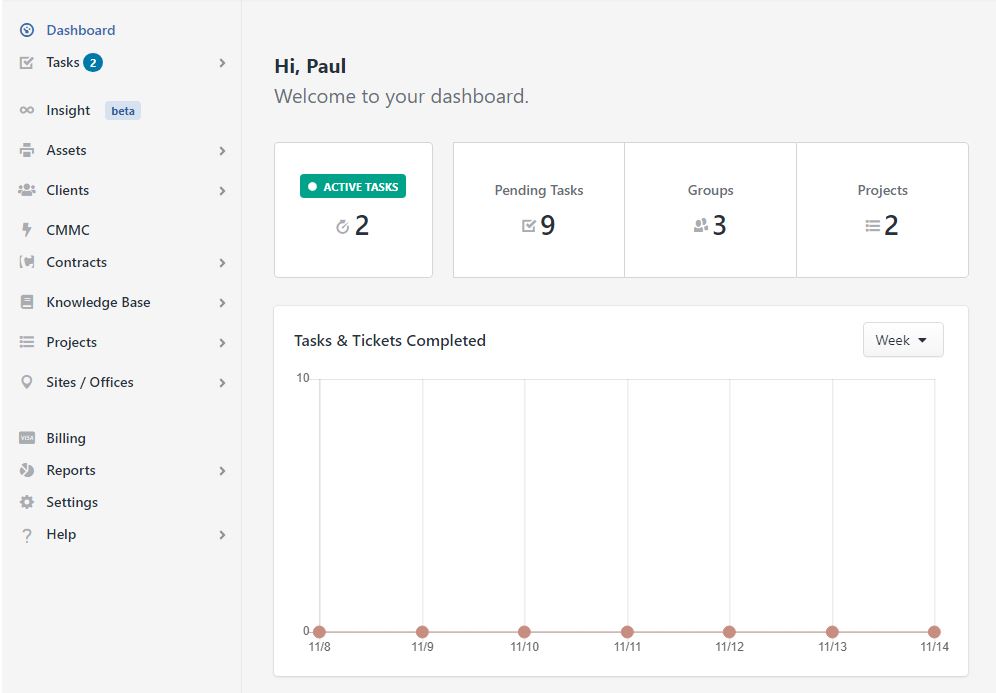
More than a help desk — a PSA for how IT actually runs
Tickets are just the start. Vertask brings the rest of your service desk into one app, so nothing lives in a spreadsheet or a second subscription.
Built for how you work
Whether you run an MSP, an internal IT team, or a one-person shop — Vertask is sized to fit.
Integrations
Connect Vertask with the tools your team already uses — and automate the work that slows you down.



Simple pricing that scales with you
Free plan for solo IT pros and small teams. Upgrade to Pro for unlimited agents, assets, contracts, reports and the full PSA feature set.
Free
A complete help desk for individuals and small teams
- Up to 2 agents
- Unlimited tickets
- Ticketing & email-to-ticket
- Client portal & knowledge base
- Up to 100 clients
- 32 Insight AI queries per day
- Email notifications
Pro
For growing teams that need the full platform
- Unlimited clients
- Everything in Free
- Unlimited Insight queries
- Asset management
- Projects & contracts
- Property management
- Workbooks & integrations
- Reports & analytics
| Feature | Free | Pro |
|---|---|---|
| Users / Agents | 2 | Unlimited |
| Daily Insight AI Usage | 32 | Unlimited |
| Tickets | Unlimited | Unlimited |
| Help Desk & Email-to-Ticket | ||
| Client Portal | ||
| Task Management | ||
| Knowledge Base | ||
| Asset Management | ||
| Client Management | Up to 100 | Unlimited |
| Contract Management | ||
| Project Management | ||
| Property Management | ||
| Workbooks | ||
| Integrations | ||
| Reports & Analytics |
Optional add-ons
Extend your Pro plan with only what you need.
Insight Pro
$6/agent/moGet Advanced AI data processing. Highly recommended for teams of 5 or more, for helpdesks and enterprise users.
Add-ons are available on the Pro plan. Contact us to get set up.
Frequently asked questions
Is there a free task management app for small teams?
Yes. Vertask offers a free forever plan for small teams with up to 2 agents — no credit card required. It includes task management, ticketing, client management (100 mx) and self service portal, and knowledgebase.
What is the easiest task management software to use?
Vertask is designed with no learning curve — most teams are up and running in minutes. The interface is built around simple lists and cards so anyone can jump in without training.
Can Vertask be used as help desk software for small businesses?
Yes. Vertask works as a free help desk software for small businesses with ticketing, a client portal, internal notes, and email-to-ticket conversion.
Does Vertask work for IT ticketing and help desk teams?
Yes. Vertask includes an IT ticketing system with task tracking, asset management, contract renewals, and a client self-service portal.
Can small teams use Vertask for free and upgrade later?
Yes. The free plan is free forever with no time limit. Upgrade any time to add more agents and unlock pro features.
How many users can I have on Vertask?
The free plan supports up to 2 agents. Pro plans are billed per agent with no upper limit — add or remove agents any time.
Does Vertask have AI features?
Yes. Insight AI is built into Vertask and can do anything you do manually — draft replies, summarize tickets, suggest next steps, and more.
Can clients submit and track their own support requests?
Yes. Vertask includes a self-service client portal where clients can submit tickets, check status, and view your knowledge base.
Can I use Vertask as a personal task manager?
Yes. Vertask works great for individuals — use the free plan to manage your own tasks, projects, and reminders.
Is Vertask good for freelancers and consultants?
Yes. Freelancers and consultants use Vertask to track client work, log time, manage contracts, and share project status with clients.
What is Property Management in Vertask?
Property Management lets you create a register of physical locations and link tasks, contracts, and assets to each one.
How do Contract Renewals work in Vertask?
Log contracts with start dates, end dates, and renewal terms — Vertask reminds you before expiration so nothing slips through.
Can I manage projects with multiple tasks in Vertask?
Yes. Projects let you group related tasks, set timelines, assign owners, and track progress in one view.
What are Workbooks in Vertask?
Workbooks are flexible data tables you can customize — track inventory, vendors, licenses, or any structured data your team needs.
Can I try Assets, Contracts, Projects, Properties or Workbooks features for free
Yes — all paid features, including Assets, Contracts, Projects, Properties, and Workbooks, are available during a 30-day free trial when you activate a Pro account. Add your card to start the trial, and if you cancel before the 30 days are up, you won't be charged anything.
Run your whole service desk from one place
Tickets, assets, contracts, SLAs and a client portal — free to start, no credit card, running in minutes.